How to read cron jobs

From time to time you may be interested in verifying that your cron jobs run as expected. How do we do that? By reading the logs of course. I will describe how to find cron logs in this article.

By default cron jobs get logged to

/var/log/syslog

To view only cron jobs, run the following command:

 grep CRON /var/log/syslog

How to Type in Yoruba

Yoruba is one of the most widely spoken indigenous languages in Africa, spoken by close to 30 million people. It is written with the normal English alphabet plus a few extra “dotted” letters: Ẹ/ẹ, Ọ/ọ, Ṣ/ṣ. Also tone marks are required, grave ` for low and acute ´ for high.

The dotted letters can be made with the US Extended keyboard layout, using Option + x, followed by the base letter. Tones can then be added using Option + Shift + ` and Option + Shift + e

Source

Multilingual Mac: Typing Yoruba. http://m10lmac.blogspot.co.uk/2007/02/typing-yoruba.html

A Visit to Amsterdam

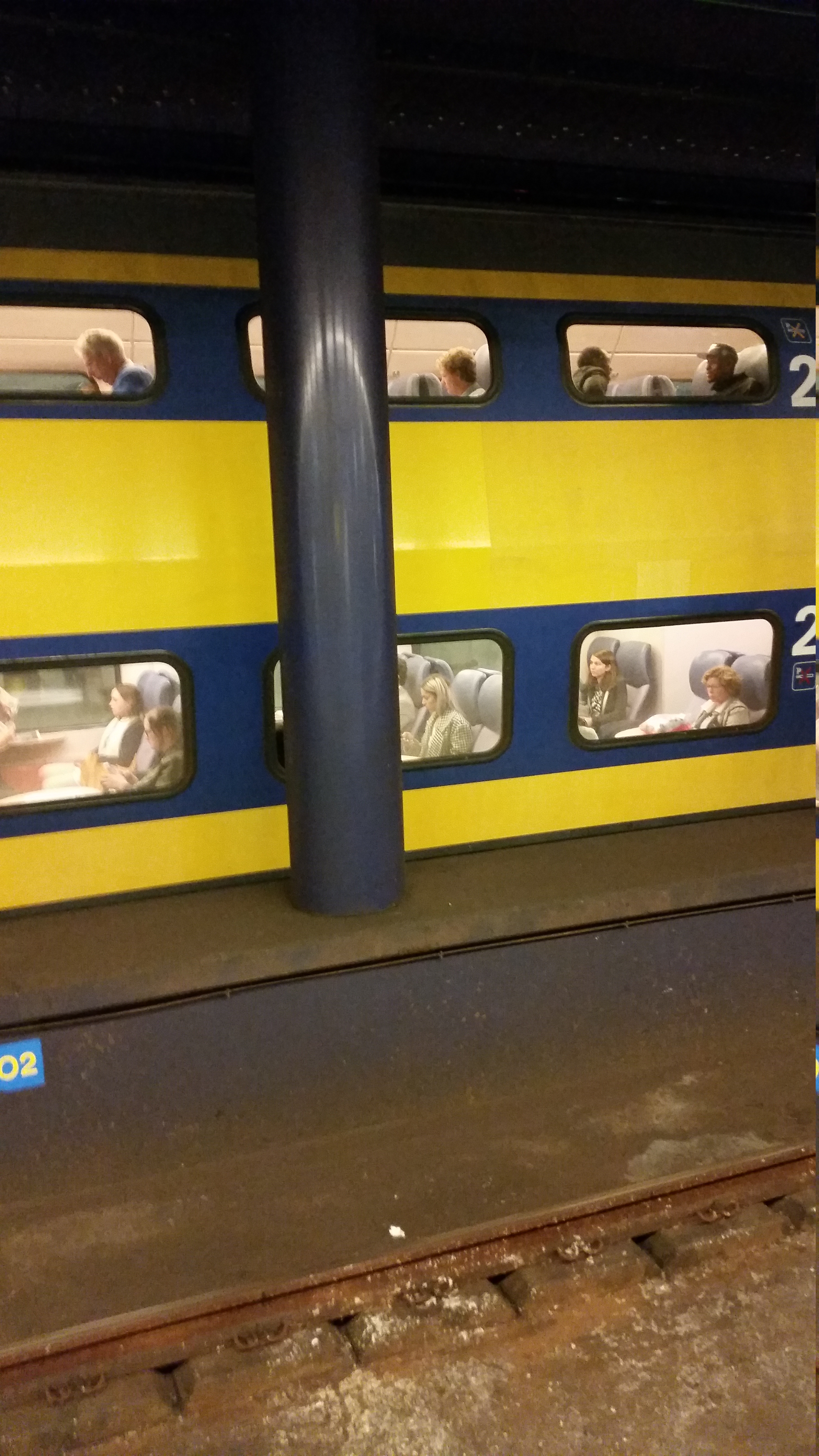
On short visit to Netherlands I had the opportunity to spend a night in Amsterdam. Boy, was it lovely! A few friends and I arrived at Schiphol airport in the evening. From here we had to board a train to Amsterdam Central Station close to where our hotel was located. I was amazed by the sight of the train. It was a double-decker train! I never knew such existed.

double-decker-train

In London double-decker buses are a common sight, but trains, not at all. Overjoyed at the prospect of boarding such novelty my friends and I went straight for the top floor!

on-the-double-decker-train4

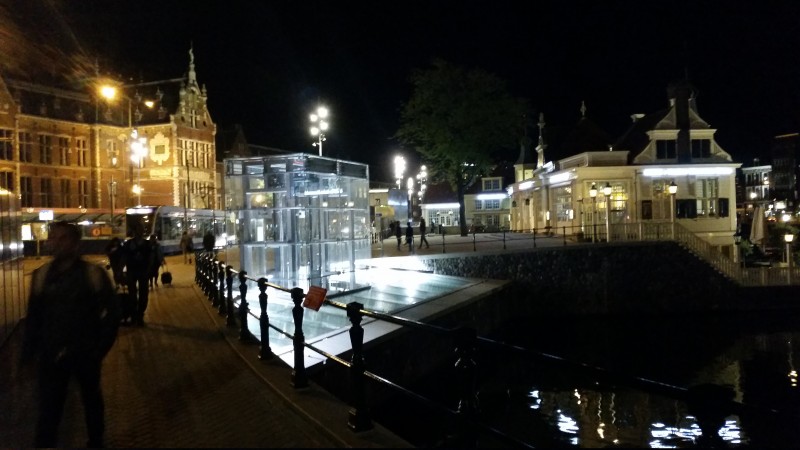
A while later we were at Amsterdam Central and I got to behold fine architecture and a plethora of tourists. The massive Victoria Hotel stood by noticeably. One thing that caught my eye was the sheer number of bicycles in the city. I’ve heard that bicycles are a popular means of transportation in Amsterdam, but you really need to see how many bikes are in this place. Honestly, I’ve never seen so many bikes close together in my life. There were trams nearby, and one could see the ocean close by with a boat or two. From the looks of things the station is a part of a sort of island.

around-amsterdam-central-station

Before reaching Amsterdam I was a bit worried that I may find it difficult communicating with the folks there, Dutch being the main language of Netherlands. But I was pleasantly surprised to find out that English is very popular in the city. Right from the airport I found many signs in English and in the city virtually everyone I talked to spoke English. In short, we had no problems getting around there. It was only later, after the trip that I realized that English is actually an official language in Amsterdam due to its long history trading with English speaking countries and the eagerness of the Dutch to learn English.

Amsterdam has a vibrant night life. There are many shops open till late, selling an assortment of things. Food shops dot the landscape with all sort of delicacies from pizza, to burger to more traditional foods. The place was chuck full of tourists walking around enjoying the sights. There’s also the Red Light Districts with its wide array of sex workers. My friends and I had an amazing time exploring the city for the short while we were there.

One small downside I noticed in the are around Amsterdam Central Station is that ATM machines seemed quite scarce. My friends and I had to ask no less than three people before we could find an ATM! So, if travelling to Amsterdam, I recommend having some Euros in cash handy. As a matter of principle I advice holding local currency in cash when travelling to any foreign country.

By and large, I will very much like to visit Amsterdam again and this time do a lot more exploration. I also recommend it as a holiday destination.

It’s all about Breathing

Yesterday was the first time I swam across the breath of the swimming pool without stopping, all thanks to my regular swimming instructor who came back from break and a particularly nice swim mate of mine who offered some crucial tips. I was ecstatic on reaching the other side. I’ll now share the tips I learnt that have improved my swimming technique.

Breathing – you have to breath out SLOWLY into the water. Don’t force out air as this makes you run out of breath quickly. Also it seems this helps you relax. It’s like when in air. You generally breath out gently. Do the same while swimming, but into the water. Previously I used to breath out quickly in water and usually found out to my utter dismay, half way through the lap that I was already out of breath and ready to sink. When I controlled my breathing I found that I could travel longer before running out of breath. This I feel is the single most important factor I altered that improved my swimming yesterday.

You have to really kick against the swimming pool wall at the beginning of a push and glide, kick routine. This gives propulsion that takes you farther through the water. In previous lessons I used to give a soft kick to the pool wall at the start of a glide. But I tried out giving the wall a solid kick and watched in glee as I glided swiftly through the water.

Take a deep breath before taking the plunge. The extra air in your lungs keeps you buoyant for longer.

Kick fast. Fast kicks from the hips appear to propel the body forward and keep you buoyant for longer. The faster you kick, the faster you move through water.

Strengthen both arms. This applies especially when learning front crawl technique. I find my right hand is stronger than my left hand when making a stroke, most likely because I’m right-handed. As such I have to do some exercises to strengthen my left hand so that I can have equally powerful strokes on both hands.

Eat at least a few hours BEFORE going to swim. Eating a lot just swimming makes you feel heavier and gives you more work to do as you try to push your weight through the water.

That’s all for now. To my fellow new swimmers out there, I hope you find some of these tips useful. If you have comments or tips you like to share, feel free to drop a comment below. Enjoy!

How to restore remote Git repo from a local copy

One way would be to re-initialize the remote repository completely cleanly and then do a push from local.

On the server, in the directory where the bare repository should live, do

git init --bare

On the client (local repo), set the new origin if it has changed, and push to the server, and set up tracking again.

git remote set-url origin <Remote_URL>
git push origin master
git branch --set-upstream-to=origin/master master

Sources

http://stackoverflow.com/questions/23397089/how-to-restore-git-bare-repository-from-local-one

Fundamentals of Mixing Video Shoots

As a member of the Media department in church I’ve had the opportunity to mix video shoots on several occasions. Here are some tips I’ve learnt on good mixing.

Have multiple cameras. The more cameras you have, the more variety you can bring into your video mixing. I am accustomed to using 3 cameras: one on the left, right and centre. So, if mixing, shoot for having multiple cameras.

Make sure a camera is still before shooting from it. Before switching to a camera, make sure the camera’s shot is steady and it isn’t likely to shift immediately.

Change views frequently. When mixing you want to introduce variety. Staying on one camera for too long makes a video shoot boring. It is akin to sitting in one spot for hours. We don’t like that now, do we? We like to move around and get different views of things. The same applies to video shoots. Also, if the speaker is moving around, then you need to know which cameras are best suited to capture him or her at any given position and use those cameras accordingly.

Pay close attention to camera men. Camera men often give signals to the mixer on certain occasions. E.g. A camera man might want to tighten a loose tripod stand, requiring him or her to stop camera feed momentarily. He or she may also want to take a break, or something else. Usually he/she will give you a signal. You need to pay attention in order to catch these messages quickly. I suppose that having walkie talkies could make this even easier.

Have frequent crowd shots – When shooting a speaker-audience event e.g. church service, it’s important to capture crowd reaction in addition to the speaker. It’s often tempting to just remain on the speaker, but unfortunately that gives a rather boring video. You want to record crowd reaction especially when the speaker says or does something that elicits an interesting audience reaction.

How to add a SMB Shared Printer on Ubuntu server to Mac

Today I’ll discuss how to add a printer hosted on an Ubuntu server via Samba to a Mac.

First, make sure the printer is on.

Next, download and install the printer driver on your Mac.

Next, open Spotlight Search and type in printers. Printers & Scanners should be highlighter. Press Enter. This will open your printer settings.

Click the + icon to add a new printer. The Add window will appear.

Click IP tab to switch to IP settings.

In the Address field, enter the ip address of the server on which the printer is connected

Under protocol, choose Internet Printing Protocol – IPP. Enter the name of the queue. To find this information, you can open the CUPS admin of the Ubuntu print server, usually at http://{{print server ip}}:631. Go to Printers page, find the printer and copy the link on the printer name. Let’s assume the printer url is http://{{print server ip}}:631/printers/{{printer name}}. In this case, you will enter printers/{{printer name}} for Queue.

Enter a suitable Name and Location.

For Use, click Select Software. The Printer Software window will appear.

Find and click the name of your printer and click OK.

Click Add.

If all goes well, the printer gets added automatically. If doing this for the first time on your Mac, a window will appear showing features you can add to your printer. Click the button to complete the process and you’re done! You can now print from your Mac.

How to stash a single file in Git

Sometimes you may be working on your Git repo and discover that you have made changes in several files and need to stash changes to only some of those modified files. How do you accomplish that? Well, there’s a handy command that goes as follows:

git stash -p

This will go through each modified file and give you an option to stash the hunk by entering ‘y’, not stash the hunk by entering ‘n’, or perform other actions. A full list, found on Stack Overflow is shown below:

   y - stash this hunk
   n - do not stash this hunk
   q - quit; do not stash this hunk or any of the remaining ones
   a - stash this hunk and all later hunks in the file
   d - do not stash this hunk or any of the later hunks in the file
   g - select a hunk to go to
   / - search for a hunk matching the given regex
   j - leave this hunk undecided, see next undecided hunk
   J - leave this hunk undecided, see next hunk
   k - leave this hunk undecided, see previous undecided hunk
   K - leave this hunk undecided, see previous hunk
   s - split the current hunk into smaller hunks
   e - manually edit the current hunk
   ? - print help